业务讲解-用户登录和退出流程解析
登录
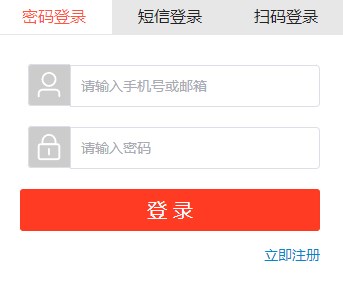
本文重点讲解关于通过手机号或者邮箱的登录方式,如图:
说明
由于将用户表进行了分库分表的操作,在其他操作中,比如查询用户信息,修改用户信息,订单的用户信息等都是是用的userId查询的
这就产生了问题,由于登录支持使用手机号和邮箱登录,那么进行分库分表的分片键要怎么选择呢?上述中提到了很多的都是靠userId作为条件的,那么还是要以userId作为分片键,但是手机号和邮箱怎么处理?为了解决这个问题,我们使用了互联网公司常用的附属表的方案,另外设计了用户手机表和用户邮箱表,这样先用手机号和邮箱查询到userId,然后userId再去操作用户表,这样就解决了分片建的问题。
关于此问题的详细介绍,可查看用户的分库分表相关文档
流程
模块: damai-user-service
入参
java
@Data
@ApiModel(value="UserLoginDto", description ="用户登录")
public class UserLoginDto {

    @ApiModelProperty(name ="code", dataType ="String", value ="渠道code 0001:pc网站", required = true)
    @NotBlank
    private String code;

    @ApiModelProperty(name ="name", dataType ="String", value ="用户手机号")
    private String mobile;

    @ApiModelProperty(name ="email", dataType ="String", value ="用户邮箱")
    private String email;

    @ApiModelProperty(name ="password", dataType ="String", value ="密码", required = true)
    @NotBlank
    private String password;
}
com.damai.service.UserService#login
java
/**
 * 登录
 * @param userLoginDto 登录入参
 * @return 用户信息
 * */
public UserLoginVo login(UserLoginDto userLoginDto) {
    UserLoginVo userLoginVo = new UserLoginVo();
    String code = userLoginDto.getCode();
    String mobile = userLoginDto.getMobile();
    String email = userLoginDto.getEmail();
    String password = userLoginDto.getPassword();
    //如果手机号和邮箱同时不存在,那么直接抛出异常
    if (StringUtil.isEmpty(mobile) && StringUtil.isEmpty(email)) {
        throw new DaMaiFrameException(BaseCode.USER_MOBILE_AND_EMAIL_NOT_EXIST);
    }
    Long userId;
    if (StringUtil.isNotEmpty(mobile)) {
        //检查输入的手机号是否达到输入错误次数限制
        String errorCountStr =
                redisCache.get(RedisKeyBuild.createRedisKey(RedisKeyManage.LOGIN_USER_MOBILE_ERROR, mobile), String.class);
        //如果达到限制的阈值则不再往下执行
        if (StringUtil.isNotEmpty(errorCountStr) && Integer.parseInt(errorCountStr) >= ERROR_COUNT_THRESHOLD) {
            throw new DaMaiFrameException(BaseCode.MOBILE_ERROR_COUNT_TOO_MANY);
        }
        //如果手机号存在,则用手机号查询用户id
        LambdaQueryWrapper<UserMobile> queryWrapper = Wrappers.lambdaQuery(UserMobile.class)
                .eq(UserMobile::getMobile, mobile);
        UserMobile userMobile = userMobileMapper.selectOne(queryWrapper);
        if (Objects.isNull(userMobile)) {
            //如果查询手机号不存在,则放入redis中将手机号输入错误的计数器加1
            redisCache.incrBy(RedisKeyBuild.createRedisKey(RedisKeyManage.LOGIN_USER_MOBILE_ERROR,mobile),1);
            redisCache.expire(RedisKeyBuild.createRedisKey(RedisKeyManage.LOGIN_USER_MOBILE_ERROR,mobile),1,TimeUnit.MINUTES);
            throw new DaMaiFrameException(BaseCode.USER_MOBILE_EMPTY);
        }
        userId = userMobile.getUserId();
    }else {
        //检查输入的邮箱是否达到输入错误次数限制
        String errorCountStr =
                redisCache.get(RedisKeyBuild.createRedisKey(RedisKeyManage.LOGIN_USER_EMAIL_ERROR, email), String.class);
        //如果达到限制的阈值则不再往下执行
        if (StringUtil.isNotEmpty(errorCountStr) && Integer.parseInt(errorCountStr) >= ERROR_COUNT_THRESHOLD) {
            throw new DaMaiFrameException(BaseCode.EMAIL_ERROR_COUNT_TOO_MANY);
        }
        //用邮箱查询用户id
        LambdaQueryWrapper<UserEmail> queryWrapper = Wrappers.lambdaQuery(UserEmail.class)
                .eq(UserEmail::getEmail, email);
        UserEmail userEmail = userEmailMapper.selectOne(queryWrapper);
        if (Objects.isNull(userEmail)) {
            //如果查询手机号不存在,则放入redis中将手机号输入错误的计数器加1
            redisCache.incrBy(RedisKeyBuild.createRedisKey(RedisKeyManage.LOGIN_USER_EMAIL_ERROR,email),1);
            redisCache.expire(RedisKeyBuild.createRedisKey(RedisKeyManage.LOGIN_USER_EMAIL_ERROR,email),1,TimeUnit.MINUTES);
            throw new DaMaiFrameException(BaseCode.USER_EMAIL_NOT_EXIST);
        }
        userId = userEmail.getUserId();
    }
    //从库中查询用户
    LambdaQueryWrapper<User> queryUserWrapper = Wrappers.lambdaQuery(User.class)
            .eq(User::getId, userId).eq(User::getPassword, password);
    User user = userMapper.selectOne(queryUserWrapper);
    //用户不存在,抛出异常
    if (Objects.isNull(user)) {
        throw new DaMaiFrameException(BaseCode.NAME_PASSWORD_ERROR);
    }
    //将用户信息放到缓存中
    redisCache.set(RedisKeyBuild.createRedisKey(RedisKeyManage.USER_LOGIN,code,user.getId()),user,
            tokenExpireTime,TimeUnit.MINUTES);
    userLoginVo.setUserId(userId);
    //生成token
    userLoginVo.setToken(createToken(user.getId(),getChannelDataByCode(code).getTokenSecret()));
    return userLoginVo;
}
通过code查询token秘钥
java
private GetChannelDataVo getChannelDataByCode(String code){
    //从redis查询
    GetChannelDataVo channelDataVo = getChannelDataByRedis(code);
    if (Objects.isNull(channelDataVo)) {
        //调用base-data服务查询
        channelDataVo = getChannelDataByClient(code);
        //放到redis中
        setChannelDataRedis(code,channelDataVo);
    }
    return channelDataVo;
}

private GetChannelDataVo getChannelDataByRedis(String code){
    return redisCache.get(RedisKeyBuild.createRedisKey(RedisKeyManage.CHANNEL_DATA,code),GetChannelDataVo.class);
}

private GetChannelDataVo getChannelDataByClient(String code){
    GetChannelDataByCodeDto getChannelDataByCodeDto = new GetChannelDataByCodeDto();
    getChannelDataByCodeDto.setCode(code);
    ApiResponse<GetChannelDataVo> getChannelDataApiResponse = baseDataClient.getByCode(getChannelDataByCodeDto);
    if (Objects.equals(getChannelDataApiResponse.getCode(), BaseCode.SUCCESS.getCode())) {
        return getChannelDataApiResponse.getData();
    }
    throw new DaMaiFrameException("没有找到ChannelData");
}
生成token
java
public String createToken(Long userId,String tokenSecret){
    Map<String,Object> map = new HashMap<>(4);
    map.put("userId",userId);
    return TokenUtil.createToken(String.valueOf(uidGenerator.getUid()), JSON.toJSONString(map),tokenExpireTime * 60 * 1000,tokenSecret);
}
总结
- 如果手机号存在,则去用户手机表查询用户id
- 如果邮箱存在,则去用户邮箱表查询用户id
- 然后根据手机号或者邮箱判断是否达到输入次数错误的限制,如果达到则锁定该用户1分钟不允许登录
- 根据用户id,去用户表中查询用户信息
- 将用户信息放入到缓存中作为登录信息,并根据
token.expire.time配置来设置过期时间,默认是40分钟 - 根据code查询到token秘钥
- 根据用户id,token秘钥来生成token,过期时间和
token.expire.time配置的相同 - 将数据返回给前端
token工具类
生成token的工具类,用于token的生成和解析,并且提供了生成和解析的示例
模块:damai-common
com.damai.jwt.TokenUtil
java
@Slf4j
public class TokenUtil {

    /**
     * 指定签名的时候使用的签名算法,也就是header那部分。
     *
     */
     private static final SignatureAlgorithm SIGNATURE_ALGORITHM = SignatureAlgorithm.HS256;
    /**
     * 用户登录成功后生成Jwt
     * 使用Hs256算法
     *
     * @param id        标识
     * @param info      登录成功的user对象
     * @param ttlMillis jwt过期时间
     * @param tokenSecret 私钥
     * @return
     */
    public static String createToken(String id, String info, long ttlMillis, String tokenSecret) {
        //生成JWT的时间
        long nowMillis = System.currentTimeMillis();

        //创建一个JwtBuilder,设置jwt的body
        JwtBuilder builder = Jwts.builder()
                //如果有私有声明,一定要先设置这个自己创建的私有的声明,这个是给builder的claim赋值,一旦写在标准的声明赋值之后,就是覆盖了那些标准的声明的
//                .setClaims(claims)
                //设置jti(JWT ID):是JWT的唯一标识,根据业务需要,这个可以设置为一个不重复的值,主要用来作为一次性token,从而回避重放攻击。
                .setId(id)
                //iat: jwt的签发时间
                .setIssuedAt(new Date(nowMillis))
                //代表这个JWT的主体,即它的所有人,这个是一个json格式的字符串。
                .setSubject(info)
                //设置签名使用的签名算法和签名使用的秘钥
                .signWith(SIGNATURE_ALGORITHM, tokenSecret);
        if (ttlMillis >= 0) {
            //设置过期时间
            builder.setExpiration(new Date(nowMillis + ttlMillis));
        }
        return builder.compact();
    }


    /**
     * Token的解密
     *
     * @param token 加密后的token
     * @param tokenSecret 私钥
     * @return
     */
    public static String parseToken(String token, String tokenSecret) {
        try {
            return Jwts.parser()
                    //设置签名的秘钥
                    .setSigningKey(tokenSecret)
                    //设置需要解析的jwt
                    .parseClaimsJws(token)
                    .getBody()
                    .getSubject();
        }catch (ExpiredJwtException jwtException) {
            log.error("parseToken error",jwtException);
            throw new DaMaiFrameException(BaseCode.TOKEN_EXPIRE);
        }

    }

    public static void main(String[] args) {

         String tokenSecret = "CSYZWECHAT";
        //生成token的实力
        JSONObject jsonObject = new JSONObject();
        jsonObject.put("001key", "001value");
        jsonObject.put("002key", "001value");

        String token1 = TokenUtil.createToken("1", jsonObject.toJSONString(), 10000, tokenSecret);
        System.out.println("token:" + token1);

        //解析token的示例
        String token2 = "eyJhbGciOiJIUzI1NiJ9.eyJqdGkiOiIxIiwiaWF0IjoxNjg4NTQyODM3LCJzdWIiOiJ7XCIwMDJrZXlcIjpcIjAwMXZhbHVlXCIsXCIwMDFrZXlcIjpcIjAwMXZhbHVlXCJ9IiwiZXhwIjoxNjg4NTQyODQ3fQ.vIKcAilTn_CR3VYssNE7rBpfuCSCH_RrkmsadLWf664";
        String subject = TokenUtil.parseToken(token2, tokenSecret);
        System.out.println("解析token后的值:" + subject);
    }
}
退出
入参
java
@Data
@ApiModel(value="UserLoginDto", description ="用户退出登录")
public class UserLogoutDto {

    @ApiModelProperty(name ="code", dataType ="String", value ="渠道code 0001:pc网站", required = true)
    @NotBlank
    private String code;

    @ApiModelProperty(name ="id", dataType ="Long", value ="用户id", required =true)
    @NotNull
    private Long id;
}
com.damai.service.UserService#logout
java
public void logout(UserLogoutDto userLogoutDto) {
    User user = userMapper.selectById(userLogoutDto.getId());
    if (Objects.isNull(user)) {
        throw new DaMaiFrameException(BaseCode.USER_EMPTY);
    }
    redisCache.del(RedisKeyBuild.createRedisKey(RedisKeyManage.USER_LOGIN,userLogoutDto.getCode(),user.getId()));
}
退出登录的逻辑比较简单,根据用户id和code删除缓存的用户信息
更新: 2025-10-29 11:34:28
原文: https://www.yuque.com/u22210564/ykdrdh/bvlg9phc26rwpsie